Monday, July 15, 2013

Tools of the Trade: Four Useful Printer Tricks


            We rely on our printers for everything from daily memos to important presentation material, which is exactly why a printer failure, malfunction, or restriction can be so frustrating. As your typical laserjet and inkjet printers can run a high overhead cost (not to mention the overhead of a plotter), seeing the largest return from your investment sometimes means taking an innovative approach to your problems. Here I aim to provide you with five useful printer tricks which save on time, and who knows, might just help you minimize on potential repair costs while pushing the limitations of your printer! Check it out below.

Print In Order
Your typical laser jet printer performs its print in a reverse order, so that the first page out of the printer is usually the last page of the document. This makes for a common sense ease-of-usage point, as most multiple page documents being fed out can be picked up and read in order. But for some reason a majority of inkjet printers still print in a direct page order, with the first page of the document being printed first and thus ending up on the bottom of the stack. Set up your printer’s default settings to reverse Print Order, usually found in the Tools/Options tab of your word processor. Quick, easy, and common sense!

Fill a Page for Formatting
If you want to see what a full page of content will look like for the sake of proper formatting, then you needn’t jump into a bunch of random typing, nor even copy and pasting. Rather, Microsoft Word allows you a helpful tool which will get your printing formatting correct before you begin your content creation. Simply type in (without quotes) “=lorem(5,6)” and hit enter to see a page with five paragraphs and six sentences per paragraph. As you may have guessed, you can change the numeric values, the first being the paragraph count and the second being the sentences per paragraph count.

Adjust Paper Setting for Higher Quality
If you’ve ever noticed that some prints come out look blotchy or discolored, this doesn’t automatically equate to a mechanical printer problem. Rather, the driver for your printer must be set for the proper paper type. Different paper types require different amounts of ink and in mixed proportions, thus you can notice an increase in the quality of the print by ensuring your printer has recognized or is set for the appropriate type of paper.

Formatter Board

Just a disclaimer: this one is pretty drastic so pursue at your own risk! Formatter boards are often the cause of many a printer problem, and one approach to fixing it proposes that putting a formatter board in the oven on aluminum risers can fix internal circuitry errors. Aluminum risers at 360 degrees Fahrenheit for eight minutes, and supposedly the formatter pops out as good as new. I tried it on a refurbished CH538-67004formatter and it worked out, but I can’t speak to the success with other formatter boards. It’s probably a solution only when repair costs exceed the cost of the system and when warranty has run out. Thanks for checking out these printer tips, and look for more content in the future!

Monday, July 8, 2013

Seller’s Guide: Servers, Plotters, and More


                It’s an unfortunate fact that, sooner or later, even our most prized piece of technology will suffer a critical error or will age to the point of being rendered obsolete. While this is an inevitable and regrettable fact, this doesn’t mean that the whole occasion doesn’t have a silver lining. If you find yourself in possession of obsolete or broken computer hardware, you can still recoup some of your overhead cost by selling the system as a whole or by its components. Selling your used computer hardware is a good way to recoup what might otherwise be a loss, padding your budget a little for future expenditures. The refurbished market is the largest buyer of such equipment, and provides a demand for a wide variety of components. Here is a guide by major computer hardware categories for the interested seller.

Selling a Used Server

Used servers are among the largest “hot commodity” with regards for computer hardware. If you find yourself needing to upgrade to another server, or if the cost of repair doesn’t warrant pursuit, then selling your server provides a nice out. Of course, you will want to make certain that all of your drives have been purged of their data, as oftentimes valuable business data is stored. The most valuable components out of your server will be the processor, system board, and memory. Components like the hard drives and power supply depreciate in value over time, as the mechanisms of their operation are more prone to malfunctions with time. You ought to be able to see a return off of the previously mentioned components, while cables/cases etc. will often require recycling.

Selling a PC/Laptop
PCs and Laptops are much the same story as servers, their primary value components being the processor, system board, and memory. However, PCs and Laptops are much more valuable the more recently they were released. Units which are ideal for business use retain value much longer than casual use computer hardware, as refurbished options are a first choice for businesses on a budget. Laptops and desktop computers will, most likely, be purchased as a whole system. While you stand to sell components individually, whole systems provide potential refurbished buyers to part down and sort machine components.

Selling Printers and Plotters

Unfortunately, selling a used printer poses several problems. While a printer may still function well enough, factors like the cost of ink and the nature of operation mean that you will see less of a return on older printers. High quality photograph or laser-jet printers are more likely to see a return. Plotters, should you find yourself in possession of a whole system, allow you to sell the machine by parts or as a whole system to a refurbished reseller. For instance, a C7769-60374 service station is a commodity in itself, but when sold with a system increases the value of the bundle as a whole. Depending on the antiquity of the system and the demand for individual parts, you might find it easier to sell main component while recycling the remaining parts. I hope to have provided you with some valuable information regarding the selling of your used computer hardware. Best of luck!

Friday, May 17, 2013

Barcode Printing Competitors: The Big Three


                Every industry inspires competition, and as new manufacturers enter a market the competition consistently breeds innovation, lest a company rest on its laurels and fall behind its competition. This holds true in every industry, and the consumer greatly benefits from this competition, which affects product quality and keeps the market value consistent. Business technologies, specifically the thermal barcode printer, are products which have seen a variety of manufacturers rise to take their share of the market. In the world of barcode printing, the three leading manufacturers are Zebra, Intermec, and Datamax. If you’re currently looking into finding a thermal barcode printer for your business, chances are you will come across these three manufacturers’ products more than any other. Each offers a variety of entry level printers. Not sure which one is best for you? Check out an entry-level spotlight from each manufacturer below to see highlights of their respective product lines.

The Zebra 2824
Zebra is currently the market leader in barcode printer sales. With a reputation for top quality thermal printing solutions, Zebra offers a great variety ranging from desktop models toward ultra high-volume industrial models. The Zebra 2824 is one of the most successful desktop models offered by Zebra, winning over several for its affordable price tag of $300. The Zebra 2824 uses thermal transfer printing as opposed to direct thermal. The 203 dpi resolution (dots per inch) is sufficient for barcode applications. With a 3.5 inch per second print speed, the Zebra 2824 can keep up with any and all entry level printing needs.

The Datamax E-4205A
Datamax is a major competitor of Zebra, but where Zebra focuses on straight forward ease of use and accessibility, Datamax printers focus on a great range of versatility. The Datamax E-4205A is an excellent small business implement, boasting an oversized roll capacity and a maximum print speed of five inches per second. The resolution remains at a 203 DPI, but the added features of USB, Serial, Parallel, and Ethernet interface justifies the extra cost. Whereas the Zebra costs a mere $300, this Datamax model comes in at an average $450. If you’re aiming for speedy, quality performance, the Datamax E-4205A is an ideal option.

The Intermec PC43T
Intermec keeps pace with the competition, and the Intermec PC43t is an excellent performance entry level barcode printer. The Intermec PC43t is a step between the Zebra and Datamax, offering a good middle ground. With a four inch print width and an LCD display, the Intermec PC43t is an easily accessible, straightforward thermal printer. The print speed, coming in at eight inches per second, is exceedingly quick, an excellent feature if you require a higher volume of barcode labels. While these three printers are excellent offerings by their respective manufacturers, personally I preferred a refurbished Datamaxprinter for its additional cost saving advantage. Just remember that these three manufacturers have a wide selection. Check them out before making your decision!

Tuesday, April 23, 2013

The Top Three Zebra Industrial Barcode Printers


               What do you do when your current desktop barcode printer is no longer keeping up with your printing demands? Certainly, it has served its purpose well enough over the years, but now it’s starting to lag just a little bit behind, slowing you and your employees down as you wait for your labels to print. The resulting slowdowns in your logistical operations decrease the efficiency of your business. Despite printing at its fastest speed, that desktop model just doesn’t cut it. You could simply get another desktop unit, but with rates of expansion you’re merely putting off the inevitable day when you run headlong into the exact same problem. If your printing needs have exceeded the capacity of the desktop class, then the solution is obvious: transition to the industrial class.
                Industrial barcode printers are heavy-duty versions of your favorite desktop unit. They are manufactured with a sturdy design. While they may not have the aesthetic appeal of some desktop units, industrial barcode printers are workhorses designed for continuous use throughout the day. Far surpassing the functionality and output capacity of desktop models, industrial barcode printers have a wide range of printing options including higher resolutions and much faster print speeds. If that sounds like the right thing for your business, then you’ll want to consider five of the best industrial class barcode printers on the market today. Here they are!

The Zebra 140Xi4

The Zebra 140Xi4 opens up the list of the top five thermal printers, showcasing a strong configuration. With a print resolution of 203 dpi, a five inch maximum print width, and sixteen megabytes of SDRAM, the Zebra is optimized for continuous operation even in the most demanding business settings. This Zebra also has multiple interface options, including Ethernet, USB, Serial, and Parallel interfaces. The Zebra 140Xi4 comes in just under $4,000 dollars, making it an investment, but a worthwhile one.

The Zebra S4M

The S4M is a much more affordable option compared to the 140Xi4, coming in at an average price just over eight hundred dollars. The S4M features multiple print resolution options, easy side-loading for media, and a durable metal case. With a print speed of six inches per second, the S4M is more than capable of keeping up with most midrange industrial printing needs.

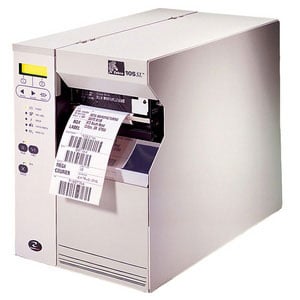
The Zebra 105SL

Settling inbetween the two prior Zebra printers, the 105SL is an excellent midrange to top-range barcode printer. With 203 or 300 dpi print resolutions, a four inch print width, and a great array of interfaces, the 105SL is the budget-minded 140Xi4 with higher performance than the S4M. The 10500-3001-0000 has a print speed of eight inches per second, outpacing the S4M. The 105SL comes in just over $2,250, making it a cost-effective business implement.